一、需求背景
俩台数据库服务器需要实时互相进行同步数据,采用docker-compose方式进行实现。
Master 1:192.168.1.137 3309端口
Master 2:192.168.1.138 3309端口
二、Master-1配置
1、创建挂载目录
mkdir -p /mysql/master1/{mydir,datadir,conf,source}
2、配置yaml文件
vim docker-compose.yaml
version: '3'services:mysql:restart: alwaysimage: mysql:5.7.34container_name: mysql-5.7master1volumes:- /mysql/master/datadir:/var/lib/mysql- /mysql/master/conf/my.cnf:/etc/my.cnfenvironment:- "MYSQL_ROOT_PASSWORD=123456"- "TZ=Asia/Shanghai"ports:- 3309:3306
3、修改my.cnf配置文件
vim conf/my.cnf
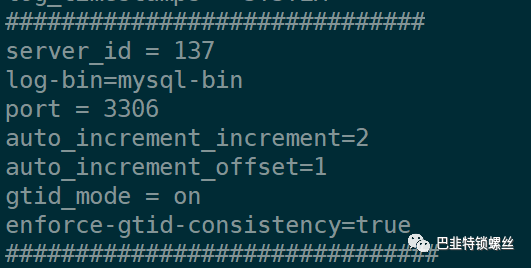
[mysqld]character-set-server = utf8collation-server = utf8_general_cisql_mode=NO_ENGINE_SUBSTITUTION,STRICT_TRANS_TABLES,NO_AUTO_CREATE_USER,NO_ZERO_DATE,NO_ZERO_IN_DATE,ERROR_FOR_DIVISION_BY_ZEROlower_case_table_names = 1transaction-isolation = READ-COMMITTEDdefault-time_zone = '+8:00'log_timestamps = SYSTEM##############################server_id = 137log-bin=mysql-binport = 3306auto_increment_increment=2auto_increment_offset=1gtid_mode = onenforce-gtid-consistency=true###############################innodb_buffer_pool_size = 2Ginnodb_log_file_size=128Minnodb_log_files_in_group=4innodb_log_buffer_size=16Minnodb_write_io_threads = 8innodb_read_io_threads = 8innodb_max_dirty_pages_pct = 90innodb_lock_wait_timeout = 120innodb-file-per-table=1auto_increment_increment=1auto_increment_offset=1connect_timeout=10group_concat_max_len=1024innodb_thread_concurrency=0innodb_thread_sleep_delay=10000innodb_write_io_threads=12interactive_timeout=28800lock_wait_timeout=31536000long_query_time=10.000000low_priority_updates=OFFmax_allowed_packet=500Mmax_connect_errors=999999999max_connections=1600max_length_for_sort_data=1024max_prepared_stmt_count=16382max_user_connections=0net_read_timeout=30net_retry_count=10net_write_timeout=60ngram_token_size=2open_files_limit=102400performance_schema=OFFquery_alloc_block_size=8192query_cache_limit=1048576query_cache_size=0query_cache_type=OFFquery_cache_wlock_invalidate=OFFquery_prealloc_size=8192slow_launch_time=2table_definition_cache=768table_open_cache=512table_open_cache_instances=16thread_cache_size=512tmp_table_size=1073741824wait_timeout=2147483interactive_timeout=31536000explicit_defaults_for_timestamp = truelog-bin-trust-function-creators = 1[client]default-character-set=utf8[mysql]default-character-set=utf8
4、创建同步用户
-- 创建用户CREATE USER 'sync'@'%' IDENTIFIED BY '123456';-- 赋予复制数据权限grant replication slave on *.* to 'sync'@'%' IDENTIFIED BY '123456';-- 刷新授权,使之立即生效flush privileges;
5、配置并开启同步
stop slave;RESET SLAVE;reset master;
change master tomaster_host='192.168.1.138',master_port=3309,master_user='sync',master_password='123456',master_auto_position = 1;start slave;
6、验证连接是否成功
SHOW SLAVE STATUS G;
mysql> SHOW SLAVE STATUS G;*************************** 1. row ***************************Slave_IO_State: Waiting for master to send eventMaster_Host: 192.168.1.138Master_User: syncMaster_Port: 3309Connect_Retry: 60Master_Log_File: mysql-bin.000001Read_Master_Log_Pos: 154Relay_Log_File: 73dbff6efba2-relay-bin.000002Relay_Log_Pos: 320Relay_Master_Log_File: mysql-bin.000001Slave_IO_Running: YesSlave_SQL_Running: YesReplicate_Do_DB:Replicate_Ignore_DB:Replicate_Do_Table:Replicate_Ignore_Table:Replicate_Wild_Do_Table:Replicate_Wild_Ignore_Table:Last_Errno: 0Last_Error:Skip_Counter: 0Exec_Master_Log_Pos: 154Relay_Log_Space: 534Until_Condition: NoneUntil_Log_File:Until_Log_Pos: 0Master_SSL_Allowed: NoMaster_SSL_CA_File:Master_SSL_CA_Path:Master_SSL_Cert:Master_SSL_Cipher:Master_SSL_Key:Seconds_Behind_Master: 0Master_SSL_Verify_Server_Cert: NoLast_IO_Errno: 0Last_IO_Error:Last_SQL_Errno: 0Last_SQL_Error:Replicate_Ignore_Server_Ids:Master_Server_Id: 138Master_UUID: 4625f6c9-aacc-11ee-9804-0242ac130002Master_Info_File: /var/lib/mysql/master.infoSQL_Delay: 0SQL_Remaining_Delay: NULLSlave_SQL_Running_State: Slave has read all relay log; waiting for more updatesMaster_Retry_Count: 86400Master_Bind:Last_IO_Error_Timestamp:Last_SQL_Error_Timestamp:Master_SSL_Crl:Master_SSL_Crlpath:Retrieved_Gtid_Set:Executed_Gtid_Set: 4625f6c9-aacc-11ee-9804-0242ac130002:1-5Auto_Position: 0Replicate_Rewrite_DB:Channel_Name:Master_TLS_Version:1 row in set (0.00 sec)
三、Master-2配置
1、创建挂载目录
mkdir -p /mysql/master2/{mydir,datadir,conf,source}
2、配置yaml文件
vim docker-compose.yaml
version: '3'services:mysql:restart: alwaysimage: mysql:5.7.34container_name: mysql-5.7master2volumes:- /mysql/slave/datadir:/var/lib/mysql- /mysql/slave/conf/my.cnf:/etc/my.cnfenvironment:- "MYSQL_ROOT_PASSWORD=123456"- "TZ=Asia/Shanghai"ports:- 3309:3306
3、修改my.cnf配置文件
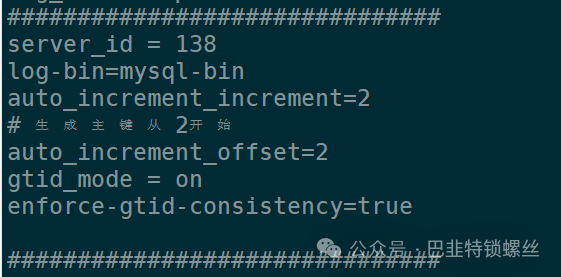
[mysqld]character-set-server = utf8collation-server = utf8_general_cisql_mode=NO_ENGINE_SUBSTITUTION,STRICT_TRANS_TABLES,NO_AUTO_CREATE_USER,NO_ZERO_DATE,NO_ZERO_IN_DATE,ERROR_FOR_DIVISION_BY_ZEROlower_case_table_names = 1transaction-isolation = READ-COMMITTEDdefault-time_zone = '+8:00'log_timestamps = SYSTEM###############################server_id = 138log-bin=mysql-binauto_increment_increment=2# 生成主键从2开始auto_increment_offset=2gtid_mode = onenforce-gtid-consistency=true###############################innodb_buffer_pool_size = 2Ginnodb_log_file_size=128Minnodb_log_files_in_group=4innodb_log_buffer_size=16Minnodb_write_io_threads = 8innodb_read_io_threads = 8innodb_max_dirty_pages_pct = 90innodb_lock_wait_timeout = 120innodb-file-per-table=1auto_increment_increment=1auto_increment_offset=1connect_timeout=10group_concat_max_len=1024innodb_thread_concurrency=0innodb_thread_sleep_delay=10000innodb_write_io_threads=12interactive_timeout=28800lock_wait_timeout=31536000long_query_time=10.000000low_priority_updates=OFFmax_allowed_packet=500Mmax_connect_errors=999999999max_connections=1600max_length_for_sort_data=1024max_prepared_stmt_count=16382max_user_connections=0net_read_timeout=30net_retry_count=10net_write_timeout=60ngram_token_size=2open_files_limit=102400performance_schema=OFFquery_alloc_block_size=8192query_cache_limit=1048576query_cache_size=0query_cache_type=OFFquery_cache_wlock_invalidate=OFFquery_prealloc_size=8192slow_launch_time=2table_definition_cache=768table_open_cache=512table_open_cache_instances=16thread_cache_size=512tmp_table_size=1073741824wait_timeout=2147483interactive_timeout=31536000explicit_defaults_for_timestamp = truelog-bin-trust-function-creators = 1[client]default-character-set=utf8[mysql]default-character-set=utf8
4、创建同步用户
-- 创建用户CREATE USER 'sync'@'%' IDENTIFIED BY '123456';-- 赋予复制数据权限grant replication slave on *.* to 'sync'@'%' IDENTIFIED BY '123456';-- 刷新授权,使之立即生效flush privileges;
5、配置并开启同步
stop slave;RESET SLAVE;reset master;
change master tomaster_host='192.168.1.138',master_port=3309,master_user='sync',master_password='123456',master_auto_position = 1;start slave;
6、验证连接是否成功
SHOW SLAVE STATUS G;
mysql> SHOW SLAVE STATUS G;*************************** 1. row ***************************Slave_IO_State: Waiting for master to send eventMaster_Host: 192.168.1.137Master_User: syncMaster_Port: 3309Connect_Retry: 60Master_Log_File: mysql-bin.000001Read_Master_Log_Pos: 154Relay_Log_File: bafd98ecfe8d-relay-bin.000002Relay_Log_Pos: 320Relay_Master_Log_File: mysql-bin.000001Slave_IO_Running: YesSlave_SQL_Running: YesReplicate_Do_DB:Replicate_Ignore_DB:Replicate_Do_Table:Replicate_Ignore_Table:Replicate_Wild_Do_Table:Replicate_Wild_Ignore_Table:Last_Errno: 0Last_Error:Skip_Counter: 0Exec_Master_Log_Pos: 154Relay_Log_Space: 534Until_Condition: NoneUntil_Log_File:Until_Log_Pos: 0Master_SSL_Allowed: NoMaster_SSL_CA_File:Master_SSL_CA_Path:Master_SSL_Cert:Master_SSL_Cipher:Master_SSL_Key:Seconds_Behind_Master: 0Master_SSL_Verify_Server_Cert: NoLast_IO_Errno: 0Last_IO_Error:Last_SQL_Errno: 0Last_SQL_Error:Replicate_Ignore_Server_Ids:Master_Server_Id: 100Master_UUID: 6754e340-aa10-11ee-9ed2-0242ac130002Master_Info_File: /var/lib/mysql/master.infoSQL_Delay: 0SQL_Remaining_Delay: NULLSlave_SQL_Running_State: Slave has read all relay log; waiting for more updatesMaster_Retry_Count: 86400Master_Bind:Last_IO_Error_Timestamp:Last_SQL_Error_Timestamp:Master_SSL_Crl:Master_SSL_Crlpath:Retrieved_Gtid_Set:Executed_Gtid_Set:Auto_Position: 0Replicate_Rewrite_DB:Channel_Name:Master_TLS_Version:1 row in set (0.00 sec)
四、报错排查处理
1、报错提示error 1236 from master when reading data from binary log:
Got fatal error 1236 from masterwhen reading data from binary log:'The slave is connecting using CHANGE MASTER TO MASTER_AUTO_POSITION = 1, but the master has purged binary logs containing GTIDs that the slave requires.Replicate the missing transactions from elsewhere, or provision a new slave from backup.Consider increasing the master's binary log expiration period.The GTID set sent by the slave is '', and the missing transactions are '4625f6c9-aacc-11ee-9804-0242ac130002:1-5'.'
原因分析:在从库重新指向到主库下一个可用的binlog file 并且从binlog file初始化的位置开始
stop slave;RESET SLAVE;重新change masterstart slave;
2、报错提示:cannot be set when MASTER_AUTO_POSITION is active.
mysql> change master to master_log_file='mysql-bin.000001', master_log_pos=154;ERROR 1776 (HY000): Parameters MASTER_LOG_FILE, MASTER_LOG_POS, RELAY_LOG_FILE and RELAY_LOG_POScannot be set when MASTER_AUTO_POSITION is active.
原因分析:在MySQL中启用了MASTER_AUTO_POSITION参数,因此不能手动设置MASTER_LOG_FILE、MASTER_LOG_POS、RELAY_LOG_FILE和RELAY_LOG_POS参数。在使用MASTER_AUTO_POSITION时,MySQL会自动跟踪主服务器上的二进制日志位置。
解决:重新change master,设置MASTER_AUTO_POSITION=0
change master tomaster_host='192.168.1.138',master_port=3309,master_user='sync',master_password='123456',master_log_file='mysql-bin.000001',master_log_pos=154,MASTER_AUTO_POSITION=0;
五、双Master复制验证与测试
在Master-1上新建数据库为solar的库,并导入sql;
同时观察到Master-2上数据可以实时进行同步。
同理,在Master-2上执行增加、删除、修改,验证效果一样。
出现同步不一致情况执行:
stop slave;RESET SLAVE;reset master;start slave;