一、安装MySQL并初始化配置
1、配置本地yum源
[mysql]name=mysqlbaseurl=https://mirrors.cloud.tencent.com/mysql/yum/mysql-5.7-community-el7-x86_64/enabled=1gpgcheck=0
2、执行yum安装,需先上车该rpm文件
yum -y install mysql-community-server-5.7.44-1.el7.x86_64.rpm3、执行启动
systemctl start mysqldsystemctl stop mysqldsystemctl status mysqld
二、初始化密码并登陆MySQL
1、修改my.cnf配置文件
添加配置内容:skip-grant-tables
2、跳过权限授权表启动
whereis mysqld/usr/sbin/mysqld --skip-grant-tables --skip-networking --user=root
3、重置root密码
mysql> SET PASSWORD FOR 'root'@'localhost' = PASSWORD('123456');Query OK, 0 rows affected, 1 warning (0.00 sec)mysql> ALTER USER 'root'@'localhost' IDENTIFIED BY '123456';Query OK, 0 rows affected (0.00 sec)mysql> FLUSH PRIVILEGES;Query OK, 0 rows affected (0.00 sec)
以上命令报错,可使用:
Query OK, 0 rows affected, 1 warning (0.00 sec)mysql> ALTER USER 'root'@'localhost' IDENTIFIED BY 'MEcTOdwlsA';Query OK, 0 rows affected (0.00 sec)Query OK, 0 rows affected (0.00 sec)
4、去除重置密码参数并重新启动
启动失败出现报错,无法正常启动:
systemctl start mysqldJob for mysqld.service failed because the control process exited with error code. See "systemctl status mysqld.service" and "journalctl -xe" for details.User[root@JQ-Node1 etc]# systemctl status mysqld -l● mysqld.service - MySQL ServerLoaded: loaded (/usr/lib/systemd/system/mysqld.service; enabled; vendor preset: disabled)Active: activating (start-pre) since 五 2023-12-22 11:11:41 CST; 175ms agoDocs: man:mysqld(8)http://dev.mysql.com/doc/refman/en/using-systemd.htmlProcess: 9997 ExecStart=/usr/sbin/mysqld --daemonize --pid-file=/var/run/mysqld/mysqld.pid $MYSQLD_OPTS (code=exited, status=1/FAILURE)Main PID: 3743 (code=exited, status=0/SUCCESS); : 10044 (mysqld_pre_syst)Tasks: 2CGroup: /system.slice/mysqld.service└─control├─10044 /bin/bash /usr/bin/mysqld_pre_systemd└─10061 /usr/bin/python -Es /usr/sbin/semanage fcontext -a -e /var/lib/mysql /var/lib/mysql-files12月 22 11:11:41 JQ-Node1 systemd[1]: Starting MySQL Server...
查看日志:tail -f /var/log/mysqld.log
2023-12-22T11:12:56.546492+08:00 0 [Note] - '::' resolves to '::';2023-12-22T11:12:56.546495+08:00 0 [Note] Server socket created on IP: '::'.2023-12-22T11:12:56.546525+08:00 0 [ERROR] Could not open unix socket lock file /var/lib/mysql/mysql.sock.lock.2023-12-22T11:12:56.546528+08:00 0 [ERROR] Unable to setup unix socket lock file.2023-12-22T11:12:56.546531+08:00 0 [ERROR] Aborting
分析:由于 MySQL 无法创建或打开 Unix 套接字锁文件 /var/lib/mysql/mysql.sock.lock 导致
解决:修改权限并重启
# ls -alh /var/lib/mysql/mysql.socksrwxrwxrwx 1 root root 0 12月 22 11:01 /var/lib/mysql/mysql.sock#修改权限sudo chmod -R 755 /var/lib/mysqlsudo chown -R mysql:mysql /var/lib/mysql
再次连接,成功登陆:
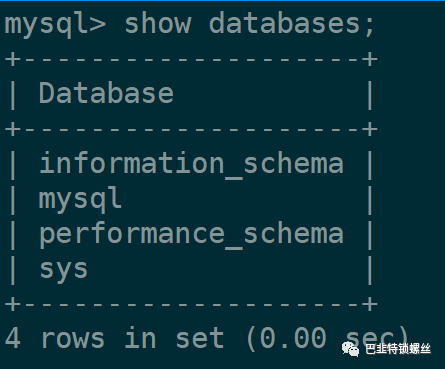
# mysql -uroot -p123456mysql: [Warning] Using a password on the command line interface can be insecure.Welcome to the MySQL monitor. Commands end with ; or g.Your MySQL connection id is 3Server version: 5.7.44 MySQL Community Server (GPL)Copyright (c) 2000, 2023, Oracle and/or its affiliates.Oracle is a registered trademark of Oracle Corporation and/or itsaffiliates. Other names may be trademarks of their respectiveowners.Type 'help;' or 'h' for help. Type 'c' to clear the current input statement.mysql>
三、MySQL自定义配置初始化启动常见问题
1、报错:no such file or directory
1月 08 10:13:22 WQ-MySQL mysqld[47817]: mysqld: Error on realpath() on '/data/mysql/mysql_files' (Error 2 - No such file or directory)1月 08 10:13:22 WQ-MySQL mysqld[47817]: 2024-01-08T02:13:22.743894Z 0 [Warning] Could not increase number of max_open_files to more than 5000 (request: 102400)1月 08 10:13:22 WQ-MySQL systemd[1]: mysqld.service: control process exited, code=exited status=11月 08 10:13:22 WQ-MySQL systemd[1]: Failed to start MySQL Server.1月 08 10:13:22 WQ-MySQL systemd[1]: Unit mysqld.service entered failed state.1月 08 10:13:22 WQ-MySQL systemd[1]: mysqld.service failed.
分析:文件或目录缺失
解决:创建对应目录
2、报错:Can't find error-message file
1月 08 10:13:24 WQ-MySQL mysqld_pre_systemd[47886]: 2024-01-08T10:13:24.996499+08:00 0[ERROR] Can't find error-message file '/data/mysql/share/mysql/errmsg.sys'.Check error-message file location and 'lc-messages-dir' configuration directive.1月 08 10:13:24 WQ-MySQL mysqld_pre_systemd[47886]: 2024-01-08T10:13:24.997123+08:00 0 [ERROR] --initialize specified but the data directory has files in it. Aborting.1月 08 10:13:24 WQ-MySQL mysqld_pre_systemd[47886]: 2024-01-08T10:13:24.997155+08:00 0 [ERROR] Aborting
分析:对应的errmsg.sys文件缺失
解决:复制安装文件其他路径到报错路径
find /data/ -name errmsg.sys|grep english
find /data/ -name errmsg.sys|grep englishcp /data/docker/overlay2/bd0699afc8adb5e646b2d211bfb2ed3814887130cce277e4872d93178624bdb3/diff/usr/share/mysql/english/errmsg.sys /data/mysql/share/mysql/
3、报错:--initialize specified but the data directory has files in it
1月 08 10:21:50 WQ-MySQL mysqld_pre_systemd[49009]: 2024-01-08T10:21:50.981519+08:00 0 [ERROR] --initialize specified but the data directory has files in it. Aborting.1月 08 10:21:50 WQ-MySQL mysqld_pre_systemd[49009]: 2024-01-08T10:21:50.981556+08:00 0 [ERROR] Aborting
分析:初始化提示对应目录已有文件
解决:备份原目录,并新建空目录,重新初始化操作即可。
4、报错:for error logging: Permission denied
1月 08 10:21:53 WQ-MySQL mysqld[49136]: 2024-01-08T10:21:53.739614+08:00 0 [ERROR] Could not open file '/data/mysql/logs/mysqld.log' for error logging: Permission denied1月 08 10:21:53 WQ-MySQL mysqld[49136]: 2024-01-08T10:21:53.739629+08:00 0 [ERROR] Aborting
分析:root启动提示权限问题
解决:调整mysql初始化路径的权限
sudo chmod -R 755 /data/mysqlsudo chown -R mysql:mysql /data/mysql
5、报错:Table 'mysql.plugin' doesn't exist
2024-01-08T10:39:48.832606+08:00 0 [Note] Plugin 'FEDERATED' is disabled.mysqld: Table 'mysql.plugin' doesn't exist2024-01-08T10:39:48.832823+08:00 0 [ERROR] Can't open the mysql.plugin table. Please run mysql_upgrade to create it.2024-01-08T10:39:48.849729+08:00 0 [ERROR] Fatal error: Can't open and lock privilege tables: Table 'mysql.user' doesn't exist2024-01-08T10:39:48.849737+08:00 0 [ERROR] Fatal error: Failed to initialize ACL/grant/time zones structures or failed to remove temporary table files.2024-01-08T10:39:48.849751+08:00 0 [ERROR] Aborting
分析:提示缺少 mysql.plugin 表,而且 'FEDERATED' 插件被禁用。这种情况下,可能需要运行 mysql_upgrade 来修复 MySQL 数据库。
解决: mysql_upgrade -u root -P33061 -p
[root@WQ-MySQL data]# mysql_upgrade -u root -P33061 -pEnter password:Checking if update is needed.Checking server version.Running queries to upgrade MySQL server.Checking system database.mysql.columns_priv OKmysql.db OKmysql.engine_cost OKmysql.event OKmysql.func OKmysql.general_log OKmysql.gtid_executed OKmysql.help_category OKmysql.help_keyword OKmysql.help_relation OKmysql.help_topic OKmysql.innodb_index_stats OKmysql.innodb_table_stats OKmysql.ndb_binlog_index OKmysql.plugin OKmysql.proc OKmysql.procs_priv OKmysql.proxies_priv OKmysql.server_cost OKmysql.servers OKmysql.slave_master_info OKmysql.slave_relay_log_info OKmysql.slave_worker_info OKmysql.slow_log OKmysql.tables_priv OKmysql.time_zone OKmysql.time_zone_leap_second OKmysql.time_zone_name OKmysql.time_zone_transition OKmysql.time_zone_transition_type OKmysql.user OKThe sys schema is already up to date (version 1.5.2).Checking databases.sys.sys_config OKUpgrade process completed successfully.Checking if update is needed.
6、执行第五步无效果:Can't open and lock privilege tables
分析:初始化的时候选择root权限,后来更改目录为mysql拥有者,可能需要重新进行初始化。
解决:先停止mysql服务,再清除原data文件目录,重新执行初始化操作。
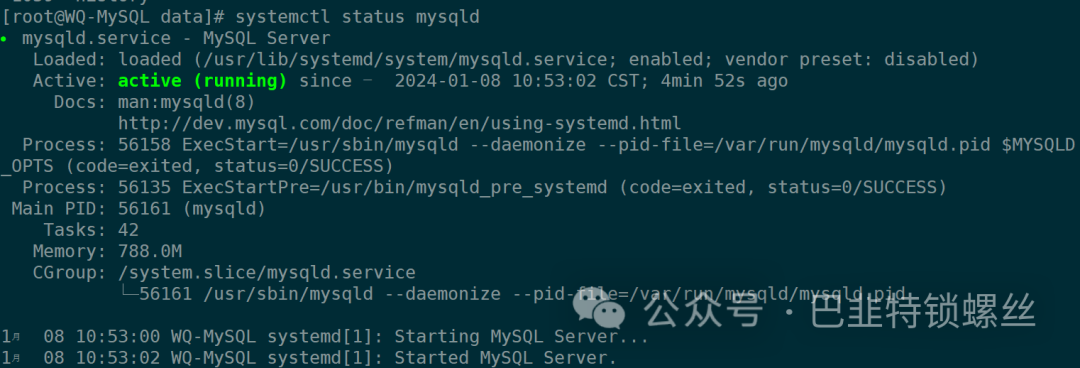
systemctl stop mysqldrm -rf 安装目录sudo mysqld --initialize --user=mysql --basedir=/home/mysql --datadir=/home/mysql/datasystemctl start mysqldsystemctl status mysqld
7、Selinux导致: [Warning] Can't create test file,日志中没有error信息,只有warning信息,但是无法启动
1月 08 13:27:14 App-WQ systemd[1]: Starting MySQL Server...1月 08 13:27:15 App-WQ mysqld[29391]: 2024-01-08T05:27:14.973865Z 0 [Warning] Could not increase number of max_open_files to more than 5000 (request: 8000)1月 08 13:27:15 App-WQ mysqld[29391]: 2024-01-08T13:27:15.094759+08:00 0 [Warning] Can't create test file /home/mysql/data/App-WQ.lower-test1月 08 13:27:15 App-WQ mysqld[29391]: 2024-01-08T13:27:15.094845+08:00 0 [Note] /usr/sbin/mysqld (mysqld 5.7.34-log) starting as process 29394 ...1月 08 13:27:15 App-WQ mysqld[29391]: 2024-01-08T13:27:15.096708+08:00 0 [Warning] Can't create test file /home/mysql/data/App-WQ.lower-test1月 08 13:27:15 App-WQ mysqld[29391]: 2024-01-08T13:27:15.096741+08:00 0 [Warning] Can't create test file /home/mysql/data/App-WQ.lower-test1月 08 13:27:15 App-WQ systemd[1]: mysqld.service: control process exited, code=exited status=11月 08 13:27:15 App-WQ systemd[1]: Failed to start MySQL Server.
分析:反复尝试各种权限设置后,发现由于linux服务器的安全策略selinux导致
解决:查看selinux状态、临时关闭、永久关闭、重新启动MySQL
[Enforcing[[Permissive[SELINUX=disabled[[● mysqld.service - MySQL ServerLoaded: loaded (/usr/lib/systemd/system/mysqld.service; enabled; vendor preset: disabled)Active: active (running) since 一 2024-01-08 13:32:27 CST; 7min agoDocs: man:mysqld(8)http://dev.mysql.com/doc/refman/en/using-systemd.htmlProcess: 29809 ExecStart=/usr/sbin/mysqld --daemonize --pid-file=/var/run/mysqld/mysqld.pid $MYSQLD_OPTS (code=exited, status=0/SUCCESS)Process: 29781 ExecStartPre=/usr/bin/mysqld_pre_systemd (code=exited, status=0/SUCCESS)Main PID: 29811 (mysqld)Tasks: 42CGroup: /system.slice/mysqld.service└─29811 /usr/sbin/mysqld --daemonize --pid-file=/var/run/mysqld/mysqld.pid1月 08 13:32:25 App-WQ systemd[1]: Starting MySQL Server...1月 08 13:32:27 App-WQ systemd[1]: Started MySQL Server.
四、防火墙及授权特定访问配置
1、防火墙授权指定服务器进行访问,比如下方只授权2台服务器IP进行访问?
sudo firewall-cmd --zone=public --add-port=33061/tcp --permanentsudo firewall-cmd --zone=public --add-rich-rule='rule family="ipv4" source address="10.18.10.63" port port="33061" protocol="tcp" accept' --permanentsudo firewall-cmd --zone=public --add-rich-rule='rule family="ipv4" source address="192.168.207.22" port port="33061" protocol="tcp" accept' --permanentsudo firewall-cmd --reloadfirewall-cmd --list-ports
2、MySQL中的root账户只授权2台服务器IP进行访问?
ON;Query OK, 0 rows affected, 1 warning (0.01 sec)mysql> FLUSH PRIVILEGES;Query OK, 0 rows affected (0.01 sec)mysql> GRANT ALL PRIVILEGES ON *.* TO 'root'@'192.168.207.22' IDENTIFIED BY 'MEcTOdwlsA' WITH GRANT OPTION;Query OK, 0 rows affected, 1 warning (0.01 sec)mysql> FLUSH PRIVILEGES;Query OK, 0 rows affected (0.00 sec)